Ask Muse to add the Pictory MCP server as a custom connector, sign in once with your Pictory account, and start creating videos in your chats.
This page adds the Pictory MCP server to Muse as a custom connector. You do this once.
You do not fill in a form. You ask Muse in a chat, and it sets up the connector for you.
After you sign in, Pictory is connected, and you can use it in your chats.
Before You Start
Use the Pictory account where you want your videos and projects to be saved.You do not need an API key or an API subscription. You sign in with your Pictory account.
A Pictory account. You sign in with it when you connect Pictory.
An active subscription or eligible Free Trial. Available video minutes, voice-over
usage, and AI Credits depend on the account or team you connect.
A Muse account that can create custom connectors. Muse is available only in some
countries, including the US, Canada, Japan, and Singapore.
Add the Pictory Connector
1
Ask Muse to add Pictory
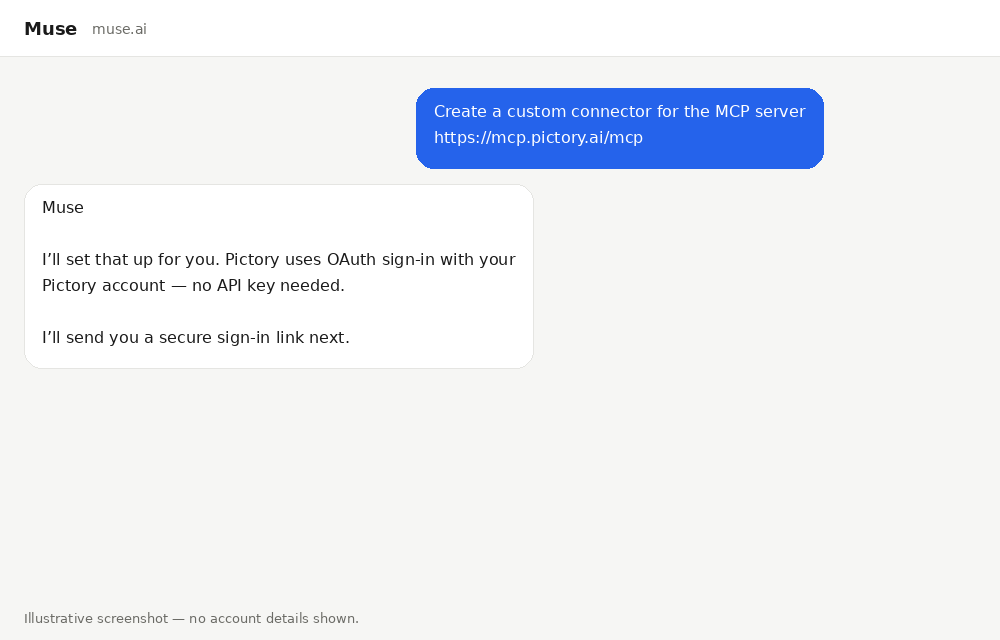
Open a Muse chat, on the web at muse.ai or in the Muse app. Send this
message:
Create a custom connector for the MCP server https://mcp.pictory.ai/mcp
Muse checks the Pictory MCP server and prepares the connection. Pictory uses sign-in with
your Pictory account, so Muse does not need an API key.
Ask Muse to create a custom connector for the Pictory MCP server.
2
Open the secure sign-in link
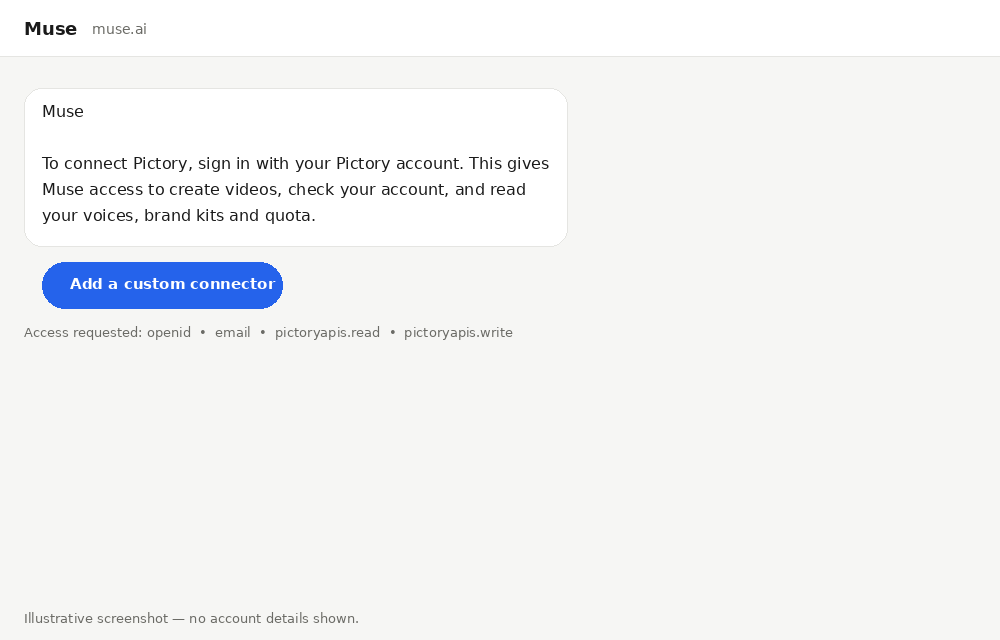
Muse sends you a secure link to connect Pictory. Select Add a custom connector.Muse also lists the access it asks for. The last two may appear in a shorter form, such as
pictoryapis.read.
Access
What it allows
openid
Confirms who you are when you sign in.
email
Shares the email address of your Pictory account.
pictoryapis/pictoryapis.read
Lets Muse read your account details, such as your voices, brand kits, and remaining usage.
pictoryapis/pictoryapis.write
Lets Muse create videos and projects in your account.
Select Add a custom connector to open the Pictory sign-in page.
Do not paste a password, API key, or token into the chat. Sign in only on the Pictory
sign-in page that the link opens.
3
Sign in to Pictory
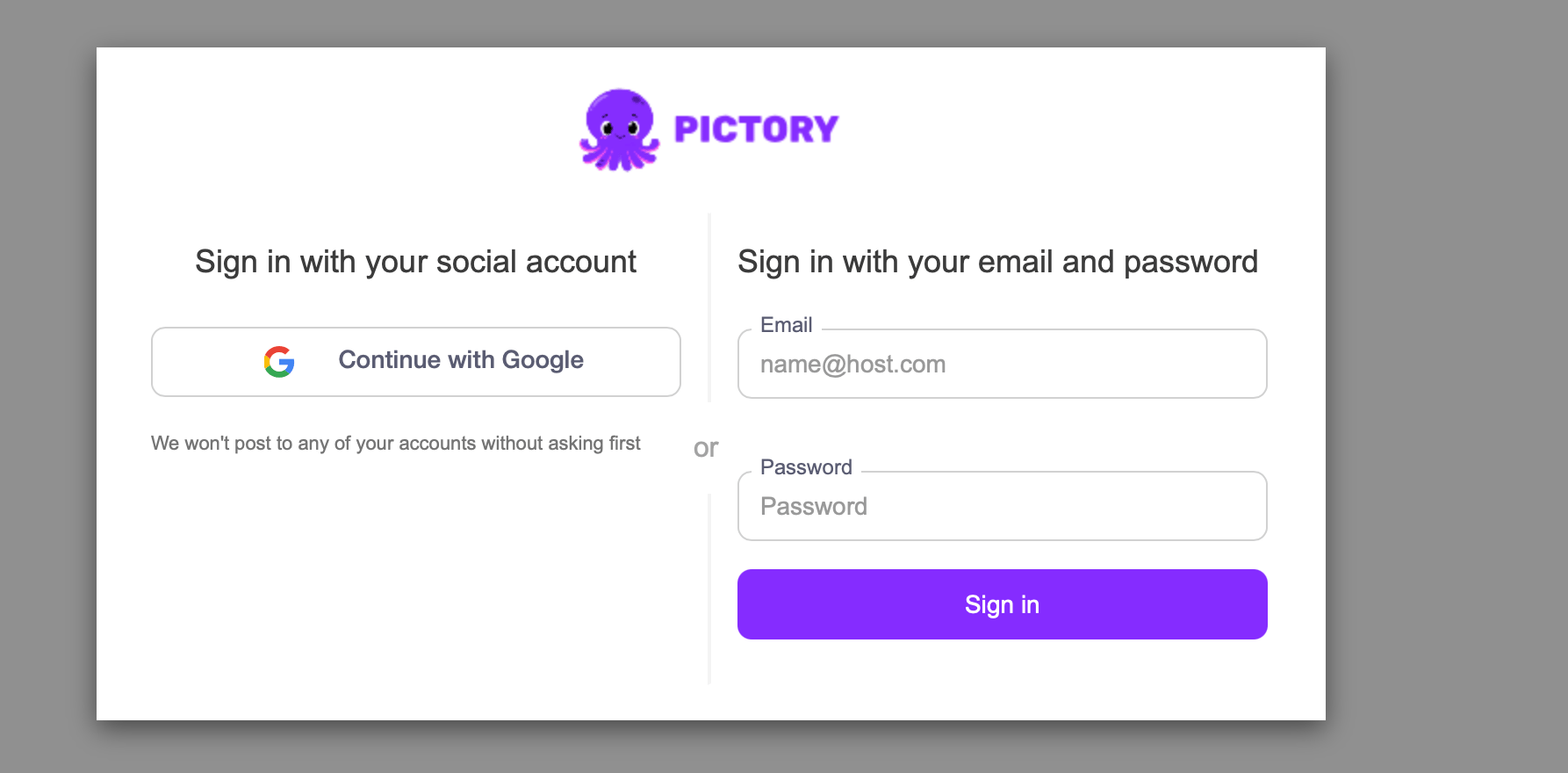
Choose one way to sign in:
Select Continue with Google.
Enter your Pictory email and password, then select Sign in.
When sign-in succeeds, go back to your Muse chat. Muse finishes setting up the connector
and checks your Pictory account.
Sign in with Google, or with your Pictory email and password.
4
Check that Pictory is connected
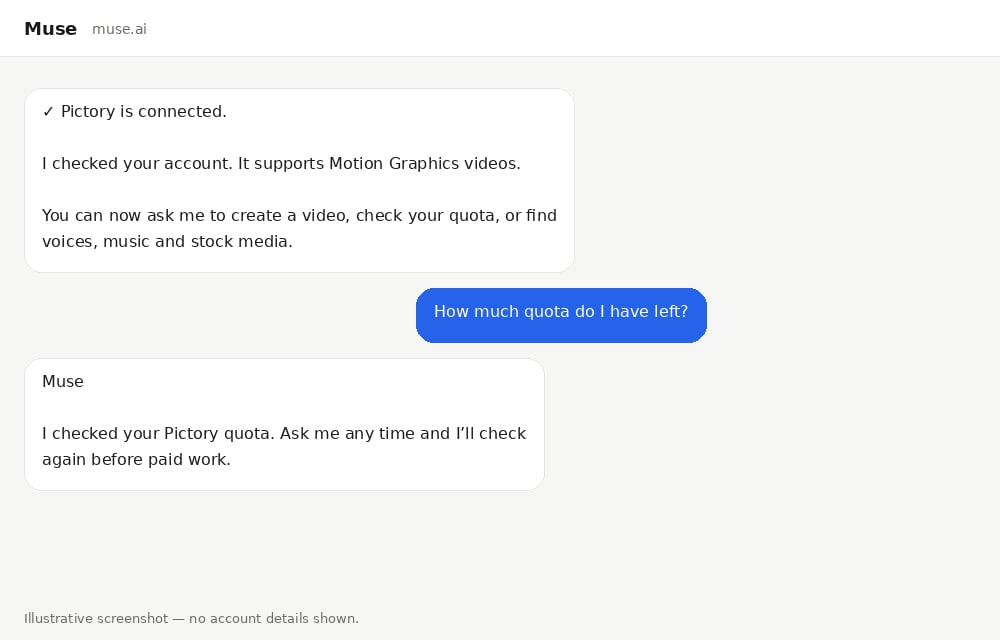
Muse tells you when Pictory is connected. It also checks which type of video your account
supports, so you do not need to choose a video type yourself.To check the connection at any time, ask Muse:
How much quota do I have left?
Muse checks your Pictory account and tells you your remaining usage.
Muse confirms that Pictory is connected and checks your quota.
Which account is billed. Usage comes from the Pictory account or team you signed in with.
Your plan sets the available video minutes, voice-over usage, and AI Credits.
Your existing Pictory projects stay in your account.
Reconnecting does not move a Pictory 2.0 account to Pictory 3.0.
Troubleshooting
Muse Says the Provider Rejected the Registration
Cause: Pictory did not accept the connection request from Muse. This is usually
temporary.Resolution:
Wait a moment, then ask Muse to try again.
If it still happens, contact Pictory support. Say that you
are connecting the Pictory MCP server in Muse.
Muse Asks for an API Key
Cause: Muse did not detect that Pictory uses sign-in with your Pictory account.Resolution:
Do not send an API key. The Pictory MCP server does not need an API key or an API
subscription.
Ask Muse to connect the Pictory MCP server with OAuth sign-in instead. OAuth means you
sign in with your Pictory account on the Pictory sign-in page.
Sign in on the Pictory sign-in page that the link opens.
An API key is only for the Pictory REST API. That is a separate way to use
Pictory, for developers who build applications.
I Signed In with the Wrong Pictory Account
Cause: The sign-in used a different Pictory account from the one where you want your
videos and projects to be saved.Resolution: Follow Use a Different Pictory Account,
and sign in with the account you want to use.
Every Request Fails After Signing In
Cause: The sign-in has expired, or the connected account does not have access to the
requested feature or enough remaining usage.Resolution:
Ask Muse to disconnect Pictory, then add it again and sign in.
Next Steps
Use Pictory in Muse
Ask for what you want in a chat and see what you get back
Pictory MCP Server
Every tool, video type, and option available through your connection
Was this page helpful?
{"docsConfig":{"theme":"mint","$schema":"https://mintlify.com/docs.json","name":"PictoryAI","colors":{"primary":"#842CFE","light":"#E4D0FF","dark":"#663399"},"logo":{"light":"https://mintcdn.com/pictory/rWdYILumD1sss1Ie/logo/pictory-logo.png?fit=max\u0026auto=format\u0026n=rWdYILumD1sss1Ie\u0026q=85\u0026s=26f687935ddb24220c55014e6b5ac5de","dark":"https://mintcdn.com/pictory/rWdYILumD1sss1Ie/logo/pictory-logo.png?fit=max\u0026auto=format\u0026n=rWdYILumD1sss1Ie\u0026q=85\u0026s=26f687935ddb24220c55014e6b5ac5de"},"favicon":"https://mintcdn.com/pictory/rWdYILumD1sss1Ie/pictory-octopus-logo.png?fit=max\u0026auto=format\u0026n=rWdYILumD1sss1Ie\u0026q=85\u0026s=bb67b7656488123aa973f893f3d23ec5","navbar":{"links":[{"href":"mailto:support@pictory.ai","label":"Support"}],"primary":{"type":"button","label":"Pictory App","href":"https://app.pictory.ai"}},"footer":{"socials":{"x":"https://x.com/pictoryai","linkedin":"https://www.linkedin.com/company/pictory","instagram":"https://www.instagram.com/pictoryai","youtube":"https://www.youtube.com/@Pictory","facebook":"https://www.facebook.com/groups/863439644603943?sorting_setting=CHRONOLOGICAL","reddit":"https://www.reddit.com/r/Pictory_Community","discord":"https://discord.gg/ugdAVjht"}},"contextual":{"options":["copy","view","chatgpt","claude","perplexity","mcp","cursor","vscode"],"display":"header"},"styling":{"latex":false},"navigation":{"pages":[]}},"deployment":{"deploymentMetadataValue":{"subdomain":"pictory","hasAudioNarration":false,"actualSubdomain":"pictory","customDomains":["docs.pictory.ai"],"gitSource":{"type":"github","owner":"pictoryai","repo":"public-api-documents","deployBranch":"main","contentDirectory":"","isPrivate":true,"mountPath":"","label":""},"feedback":{"thumbs":true},"entitlements":{"AI_CHAT":{"status":"ENABLED"},"CONTEXTUAL_FEEDBACK":{"status":"ENABLED"},"CODE_SNIPPET_FEEDBACK":{"status":"ENABLED"},"WEB_MCP":{"status":"ENABLED"},"NARRATION":{"status":"ENABLED"}},"buildId":"6afe664346bf5a2cce05229a","clientVersion":"0.0.4205","searchFilterCounts":[{"language":"default","tag":"Developer Guide","count":58},{"language":"default","tag":"API Reference","count":57},{"language":"default","tag":"AI Studio","count":16},{"language":"default","tag":"Advanced Features","count":10},{"language":"default","tag":"Pictory for Claude","count":9},{"language":"default","tag":"Integration","count":8},{"language":"default","tag":"MCP Server","count":7},{"language":"default","tag":"Music Search","count":6},{"language":"default","tag":"Getting Started","count":6},{"language":"default","tag":"AI-Generated Visuals","count":6}]},"assistantConfig":{"enableAskAiButton":true,"enableStarterQuestions":false,"enableAskAiSearchBar":false,"deflection":{"enabled":true,"email":"support@pictory.ai","showHelpButton":true}},"basePath":"","hasChatPermissions":true,"hasWebMcpPermissions":true,"toggles":[{"name":"kill-isr","enabled":true,"variant":{"name":"disabled","enabled":false,"feature_enabled":true},"impressionData":false},{"name":"custom-rbac-roles","enabled":true,"variant":{"name":"disabled","enabled":false,"feature_enabled":true},"impressionData":false},{"name":"agent-mintlify-slack","enabled":true,"variant":{"name":"disabled","enabled":false,"feature_enabled":true},"impressionData":false},{"name":"agent-integrations-settings","enabled":true,"variant":{"name":"disabled","enabled":false,"feature_enabled":true},"impressionData":false},{"name":"rbac-expansion","enabled":true,"variant":{"name":"disabled","enabled":false,"feature_enabled":true},"impressionData":false},{"name":"automations-pr-grouping","enabled":true,"variant":{"name":"disabled","enabled":false,"feature_enabled":true},"impressionData":false},{"name":"custom-prefix","enabled":true,"variant":{"name":"disabled","enabled":false,"feature_enabled":true},"impressionData":false},{"name":"analytics-v7","enabled":true,"variant":{"name":"disabled","enabled":false,"feature_enabled":true},"impressionData":false},{"name":"user-flows-analytics","enabled":true,"variant":{"name":"disabled","enabled":false,"feature_enabled":true},"impressionData":false},{"name":"no-publish-flow","enabled":true,"variant":{"name":"disabled","enabled":false,"feature_enabled":true},"impressionData":false},{"name":"workos-onboarding","enabled":true,"variant":{"name":"disabled","enabled":false,"feature_enabled":true},"impressionData":false},{"name":"snapshot-serving-live","enabled":true,"variant":{"name":"disabled","enabled":false,"feature_enabled":true},"impressionData":false},{"name":"stripTemperatureMiddleware","enabled":true,"variant":{"name":"disabled","enabled":false,"feature_enabled":true},"impressionData":false},{"name":"support-platform-pylon-zendesk","enabled":true,"variant":{"name":"disabled","enabled":false,"feature_enabled":true},"impressionData":false},{"name":"snapshot-serving","enabled":true,"variant":{"name":"disabled","enabled":false,"feature_enabled":true},"impressionData":false},{"name":"instant-rollback","enabled":true,"variant":{"name":"disabled","enabled":false,"feature_enabled":true},"impressionData":false},{"name":"granular-notifications-server","enabled":true,"variant":{"name":"disabled","enabled":false,"feature_enabled":true},"impressionData":false},{"name":"granular-notifications","enabled":true,"variant":{"name":"disabled","enabled":false,"feature_enabled":true},"impressionData":false},{"name":"automations-fable","enabled":true,"variant":{"name":"disabled","enabled":false,"feature_enabled":true},"impressionData":false},{"name":"fixed-ai-action-pricing","enabled":true,"variant":{"name":"disabled","enabled":false,"feature_enabled":true},"impressionData":false},{"name":"automation-resolve-merge-conflict","enabled":true,"variant":{"name":"disabled","enabled":false,"feature_enabled":true},"impressionData":false},{"name":"scoped-publishing","enabled":true,"variant":{"name":"disabled","enabled":false,"feature_enabled":true},"impressionData":false},{"name":"mintql","enabled":true,"variant":{"name":"disabled","enabled":false,"feature_enabled":true},"impressionData":false},{"name":"page-level-analytics","enabled":true,"variant":{"name":"disabled","enabled":false,"feature_enabled":true},"impressionData":false},{"name":"editor-version-history-v2","enabled":true,"variant":{"name":"disabled","enabled":false,"feature_enabled":true},"impressionData":false},{"name":"billing-page-v2","enabled":true,"variant":{"name":"disabled","enabled":false,"feature_enabled":true},"impressionData":false},{"name":"full-page-search","enabled":true,"variant":{"name":"disabled","enabled":false,"feature_enabled":true},"impressionData":false},{"name":"workspace-projects","enabled":true,"variant":{"name":"disabled","enabled":false,"feature_enabled":true},"impressionData":false},{"name":"assistant-v5","enabled":true,"variant":{"name":"disabled","enabled":false,"feature_enabled":true},"impressionData":false},{"name":"fork-pr-previews","enabled":true,"variant":{"name":"disabled","enabled":false,"feature_enabled":true},"impressionData":false},{"name":"revalidation-jwt","enabled":true,"variant":{"name":"disabled","enabled":false,"feature_enabled":true},"impressionData":false},{"name":"workos-sso-scim","enabled":true,"variant":{"name":"disabled","enabled":false,"feature_enabled":true},"impressionData":false},{"name":"hobby-abuse-scan","enabled":true,"variant":{"name":"disabled","enabled":false,"feature_enabled":true},"impressionData":false},{"name":"dashboard-inbox","enabled":true,"variant":{"name":"disabled","enabled":false,"feature_enabled":true},"impressionData":false},{"name":"workos-signup","enabled":true,"variant":{"name":"disabled","enabled":false,"feature_enabled":true},"impressionData":false},{"name":"turbopuffer-dual-write","enabled":true,"variant":{"name":"disabled","enabled":false,"feature_enabled":true},"impressionData":false},{"name":"workos-enabled","enabled":true,"variant":{"name":"disabled","enabled":false,"feature_enabled":true},"impressionData":false},{"name":"approve-review-flow","enabled":true,"variant":{"name":"disabled","enabled":false,"feature_enabled":true},"impressionData":false},{"name":"editor-metadata","enabled":true,"variant":{"name":"disabled","enabled":false,"feature_enabled":true},"impressionData":false},{"name":"sso-setup-deadline-banner","enabled":true,"variant":{"name":"disabled","enabled":false,"feature_enabled":true},"impressionData":false},{"name":"turbopuffer-serve","enabled":true,"variant":{"name":"disabled","enabled":false,"feature_enabled":true},"impressionData":false},{"name":"live-agents","enabled":true,"variant":{"name":"disabled","enabled":false,"feature_enabled":true},"impressionData":false},{"name":"starter-pricing","enabled":true,"variant":{"name":"treatment","enabled":true,"payload":{"type":"string","value":"treatment"},"feature_enabled":true},"impressionData":false},{"name":"llms-txt-v2","enabled":true,"variant":{"name":"disabled","enabled":false,"feature_enabled":true},"impressionData":false},{"name":"wildcard-email-auth","enabled":true,"variant":{"name":"disabled","enabled":false,"feature_enabled":true},"impressionData":false}],"googleFontsInlined":false},"customCss":[],"page":{"pagePath":"muse/connect-muse","slug":"/muse/connect-muse","pageMetadata":{"title":"Connect from Muse","description":"Ask Muse to add the Pictory MCP server as a custom connector, sign in once with your Pictory account, and start creating videos in your chats.","icon":"plug","href":"/muse/connect-muse"},"description":{"compiledSource":"\"use strict\";\nconst {jsx: _jsx} = arguments[0];\nconst {useMDXComponents: _provideComponents} = arguments[0];\nfunction _createMdxContent(props) {\n const _components = {\n p: \"p\",\n ..._provideComponents(),\n ...props.components\n };\n return _jsx(_components.p, {\n children: \"Ask Muse to add the Pictory MCP server as a custom connector, sign in once with your Pictory account, and start creating videos in your chats.\"\n });\n}\nfunction MDXContent(props = {}) {\n const {wrapper: MDXLayout} = {\n ..._provideComponents(),\n ...props.components\n };\n return MDXLayout ? _jsx(MDXLayout, {\n ...props,\n children: _jsx(_createMdxContent, {\n ...props\n })\n }) : _createMdxContent(props);\n}\nreturn {\n default: MDXContent\n};\n","frontmatter":{},"scope":{}},"pageType":"default","mdx":{"mdxSource":{"compiledSource":"\"use strict\";const{Fragment:_Fragment,jsx:_jsx,jsxs:_jsxs}=arguments[0];const{useMDXComponents:_provideComponents}=arguments[0];function _createMdxContent(props){const _components={a:`a`,blockquote:`blockquote`,code:`code`,li:`li`,ol:`ol`,p:`p`,pre:`pre`,span:`span`,strong:`strong`,tbody:`tbody`,td:`td`,th:`th`,thead:`thead`,tr:`tr`,ul:`ul`,..._provideComponents(),...props.components},{Accordion,AccordionGroup,Card,CardGroup,CodeBlock,Frame,Heading,Info,OptimizedImage,Step,Steps,Table,Warning}=_components;if(!Accordion)_missingMdxReference(`Accordion`,true);if(!AccordionGroup)_missingMdxReference(`AccordionGroup`,true);if(!Card)_missingMdxReference(`Card`,true);if(!CardGroup)_missingMdxReference(`CardGroup`,true);if(!CodeBlock)_missingMdxReference(`CodeBlock`,true);if(!Frame)_missingMdxReference(`Frame`,true);if(!Heading)_missingMdxReference(`Heading`,true);if(!Info)_missingMdxReference(`Info`,true);if(!OptimizedImage)_missingMdxReference(`OptimizedImage`,true);if(!Step)_missingMdxReference(`Step`,true);if(!Steps)_missingMdxReference(`Steps`,true);if(!Table)_missingMdxReference(`Table`,true);if(!Warning)_missingMdxReference(`Warning`,true);return _jsxs(_Fragment,{children:[_jsx(_components.p,{children:`This page adds the Pictory MCP server to Muse as a custom connector. You do this once.\nYou do not fill in a form. You ask Muse in a chat, and it sets up the connector for you.\nAfter you sign in, Pictory is connected, and you can use it in your chats.`}),`\n`,_jsx(Heading,{level:`2`,id:`before-you-start`,children:`Before You Start`}),`\n`,_jsx(_components.p,{children:`Use the Pictory account where you want your videos and projects to be saved.`}),`\n`,_jsxs(_components.p,{children:[_jsx(_components.strong,{children:`You do not need an API key or an API subscription.`}),` You sign in with your Pictory account.`]}),`\n`,_jsxs(_components.ul,{children:[`\n`,_jsxs(_components.li,{children:[_jsx(_components.strong,{children:`A Pictory account.`}),` You sign in with it when you connect Pictory.`]}),`\n`,_jsxs(_components.li,{children:[_jsx(_components.strong,{children:`An active subscription or eligible Free Trial.`}),` Available video minutes, voice-over\nusage, and AI Credits depend on the account or team you connect.`]}),`\n`,_jsxs(_components.li,{children:[_jsx(_components.strong,{children:`A Muse account that can create custom connectors.`}),` Muse is available only in some\ncountries, including the US, Canada, Japan, and Singapore.`]}),`\n`]}),`\n`,_jsx(Heading,{level:`2`,id:`add-the-pictory-connector`,children:`Add the Pictory Connector`}),`\n`,_jsxs(Steps,{children:[_jsxs(Step,{title:`Ask Muse to add Pictory`,children:[_jsxs(_components.p,{children:[`Open a Muse chat, on the web at `,_jsx(_components.a,{href:`https://muse.ai`,children:`muse.ai`}),` or in the Muse app. Send this\nmessage:`]}),_jsx(CodeBlock,{filename:``,numberOfLines:`2`,language:`text`,children:_jsx(_components.pre,{className:`shiki shiki-themes github-light-default dark-plus`,style:{backgroundColor:`#ffffff`,\"--shiki-dark-bg\":`#0B0C0E`,color:`#1f2328`,\"--shiki-dark\":`#D4D4D4`},language:`text`,children:_jsxs(_components.code,{language:`text`,numberOfLines:`2`,children:[_jsx(_components.span,{className:`line`,children:_jsx(_components.span,{children:`Create a custom connector for the MCP server https://mcp.pictory.ai/mcp`})}),`\n`,_jsx(_components.span,{className:`line`,children:_jsx(_components.span,{})})]})})}),_jsx(_components.p,{children:`Muse checks the Pictory MCP server and prepares the connection. Pictory uses sign-in with\nyour Pictory account, so Muse does not need an API key.`}),_jsx(Frame,{caption:`Ask Muse to create a custom connector for the Pictory MCP server.`,children:_jsx(OptimizedImage,{src:`https://mintcdn.com/pictory/rq8a8JSlPTfTNpMj/images/muse-mcp/ask-muse-to-connect.png?fit=max\u0026auto=format\u0026n=rq8a8JSlPTfTNpMj\u0026q=85\u0026s=b7405d81096f968f447814ce6f66bade`,alt:`A Muse chat with the message Create a custom connector for the MCP server https://mcp.pictory.ai/mcp, and a reply saying that Pictory uses sign-in with a Pictory account and that a secure sign-in link comes next`,\"data-og-width\":`1000`,width:`1000`,\"data-og-height\":`640`,height:`640`,\"data-path\":`images/muse-mcp/ask-muse-to-connect.png`,\"data-optimize\":`true`,\"data-opv\":`3`,srcset:`https://mintcdn.com/pictory/rq8a8JSlPTfTNpMj/images/muse-mcp/ask-muse-to-connect.png?w=280\u0026fit=max\u0026auto=format\u0026n=rq8a8JSlPTfTNpMj\u0026q=85\u0026s=e1a85141a8365333b40a2b5c2db1adf8 280w, https://mintcdn.com/pictory/rq8a8JSlPTfTNpMj/images/muse-mcp/ask-muse-to-connect.png?w=560\u0026fit=max\u0026auto=format\u0026n=rq8a8JSlPTfTNpMj\u0026q=85\u0026s=1539f02db3319b49d3940d26a62d97f3 560w, https://mintcdn.com/pictory/rq8a8JSlPTfTNpMj/images/muse-mcp/ask-muse-to-connect.png?w=840\u0026fit=max\u0026auto=format\u0026n=rq8a8JSlPTfTNpMj\u0026q=85\u0026s=08dcc46e956375ee091925a396586088 840w, https://mintcdn.com/pictory/rq8a8JSlPTfTNpMj/images/muse-mcp/ask-muse-to-connect.png?w=1100\u0026fit=max\u0026auto=format\u0026n=rq8a8JSlPTfTNpMj\u0026q=85\u0026s=e1d1c92d2c2451a68586ef7b0e654bb4 1100w, https://mintcdn.com/pictory/rq8a8JSlPTfTNpMj/images/muse-mcp/ask-muse-to-connect.png?w=1650\u0026fit=max\u0026auto=format\u0026n=rq8a8JSlPTfTNpMj\u0026q=85\u0026s=f1cccb1dae0fc97da3ce291264a876c6 1650w, https://mintcdn.com/pictory/rq8a8JSlPTfTNpMj/images/muse-mcp/ask-muse-to-connect.png?w=2500\u0026fit=max\u0026auto=format\u0026n=rq8a8JSlPTfTNpMj\u0026q=85\u0026s=91adfc5c78ee62b3c130273c654108b7 2500w`})})]}),_jsxs(Step,{title:`Open the secure sign-in link`,children:[_jsxs(_components.p,{children:[`Muse sends you a secure link to connect Pictory. Select `,_jsx(_components.strong,{children:`Add a custom connector`}),`.`]}),_jsxs(_components.p,{children:[`Muse also lists the access it asks for. The last two may appear in a shorter form, such as\n`,_jsx(_components.code,{children:`pictoryapis.read`}),`.`]}),_jsxs(Table,{children:[_jsx(_components.thead,{children:_jsxs(_components.tr,{children:[_jsx(_components.th,{children:`Access`}),_jsx(_components.th,{children:`What it allows`})]})}),_jsxs(_components.tbody,{children:[_jsxs(_components.tr,{children:[_jsx(_components.td,{children:_jsx(_components.code,{children:`openid`})}),_jsx(_components.td,{children:`Confirms who you are when you sign in.`})]}),_jsxs(_components.tr,{children:[_jsx(_components.td,{children:_jsx(_components.code,{children:`email`})}),_jsx(_components.td,{children:`Shares the email address of your Pictory account.`})]}),_jsxs(_components.tr,{children:[_jsx(_components.td,{children:_jsx(_components.code,{children:`pictoryapis/pictoryapis.read`})}),_jsx(_components.td,{children:`Lets Muse read your account details, such as your voices, brand kits, and remaining usage.`})]}),_jsxs(_components.tr,{children:[_jsx(_components.td,{children:_jsx(_components.code,{children:`pictoryapis/pictoryapis.write`})}),_jsx(_components.td,{children:`Lets Muse create videos and projects in your account.`})]})]})]}),_jsx(Frame,{caption:`Select Add a custom connector to open the Pictory sign-in page.`,children:_jsx(OptimizedImage,{src:`https://mintcdn.com/pictory/rq8a8JSlPTfTNpMj/images/muse-mcp/add-custom-connector.png?fit=max\u0026auto=format\u0026n=rq8a8JSlPTfTNpMj\u0026q=85\u0026s=e08baa2f2f135505565ed964f807ef7d`,alt:`A Muse reply asking you to sign in with your Pictory account, with the Add a custom connector button and the access requested: openid, email, pictoryapis.read, and pictoryapis.write`,\"data-og-width\":`1000`,width:`1000`,\"data-og-height\":`640`,height:`640`,\"data-path\":`images/muse-mcp/add-custom-connector.png`,\"data-optimize\":`true`,\"data-opv\":`3`,srcset:`https://mintcdn.com/pictory/rq8a8JSlPTfTNpMj/images/muse-mcp/add-custom-connector.png?w=280\u0026fit=max\u0026auto=format\u0026n=rq8a8JSlPTfTNpMj\u0026q=85\u0026s=4f6e2fd9fb5bd735f2bfd3565b9d3977 280w, https://mintcdn.com/pictory/rq8a8JSlPTfTNpMj/images/muse-mcp/add-custom-connector.png?w=560\u0026fit=max\u0026auto=format\u0026n=rq8a8JSlPTfTNpMj\u0026q=85\u0026s=8d357c01f7a1af5a2397cf22604e0c3d 560w, https://mintcdn.com/pictory/rq8a8JSlPTfTNpMj/images/muse-mcp/add-custom-connector.png?w=840\u0026fit=max\u0026auto=format\u0026n=rq8a8JSlPTfTNpMj\u0026q=85\u0026s=5fd0aa81d32338b26b80ffd546119996 840w, https://mintcdn.com/pictory/rq8a8JSlPTfTNpMj/images/muse-mcp/add-custom-connector.png?w=1100\u0026fit=max\u0026auto=format\u0026n=rq8a8JSlPTfTNpMj\u0026q=85\u0026s=3ac0eb19f36849b352450884ab2d9792 1100w, https://mintcdn.com/pictory/rq8a8JSlPTfTNpMj/images/muse-mcp/add-custom-connector.png?w=1650\u0026fit=max\u0026auto=format\u0026n=rq8a8JSlPTfTNpMj\u0026q=85\u0026s=92b9ab74ed7643872fc1a429497dda48 1650w, https://mintcdn.com/pictory/rq8a8JSlPTfTNpMj/images/muse-mcp/add-custom-connector.png?w=2500\u0026fit=max\u0026auto=format\u0026n=rq8a8JSlPTfTNpMj\u0026q=85\u0026s=c09bfa3d34afa2c923be4a18cf3e9f5a 2500w`})}),_jsx(Warning,{children:_jsx(_components.p,{children:`Do not paste a password, API key, or token into the chat. Sign in only on the Pictory\nsign-in page that the link opens.`})})]}),_jsxs(Step,{title:`Sign in to Pictory`,children:[_jsx(_components.p,{children:`Choose one way to sign in:`}),_jsxs(_components.ul,{children:[`\n`,_jsxs(_components.li,{children:[`Select `,_jsx(_components.strong,{children:`Continue with Google`}),`.`]}),`\n`,_jsxs(_components.li,{children:[`Enter your Pictory email and password, then select `,_jsx(_components.strong,{children:`Sign in`}),`.`]}),`\n`]}),_jsx(_components.p,{children:`When sign-in succeeds, go back to your Muse chat. Muse finishes setting up the connector\nand checks your Pictory account.`}),_jsx(Frame,{caption:`Sign in with Google, or with your Pictory email and password.`,children:_jsx(OptimizedImage,{src:`https://mintcdn.com/pictory/l2SkllNpxXDkx6L0/images/chatgpt-mcp/pictory-sign-in.png?fit=max\u0026auto=format\u0026n=l2SkllNpxXDkx6L0\u0026q=85\u0026s=92b93a1a4f1737f7379f92d2a641b249`,alt:`The Pictory sign-in page with the Continue with Google button and the email and password fields`,\"data-og-width\":`1786`,width:`1786`,\"data-og-height\":`880`,height:`880`,\"data-path\":`images/chatgpt-mcp/pictory-sign-in.png`,\"data-optimize\":`true`,\"data-opv\":`3`,srcset:`https://mintcdn.com/pictory/l2SkllNpxXDkx6L0/images/chatgpt-mcp/pictory-sign-in.png?w=280\u0026fit=max\u0026auto=format\u0026n=l2SkllNpxXDkx6L0\u0026q=85\u0026s=1be7d9582a4f799cc21e981267c3ef35 280w, https://mintcdn.com/pictory/l2SkllNpxXDkx6L0/images/chatgpt-mcp/pictory-sign-in.png?w=560\u0026fit=max\u0026auto=format\u0026n=l2SkllNpxXDkx6L0\u0026q=85\u0026s=5faa81adf60397b836079509a74a1a7c 560w, https://mintcdn.com/pictory/l2SkllNpxXDkx6L0/images/chatgpt-mcp/pictory-sign-in.png?w=840\u0026fit=max\u0026auto=format\u0026n=l2SkllNpxXDkx6L0\u0026q=85\u0026s=d16decc96850af17602664990fedacba 840w, https://mintcdn.com/pictory/l2SkllNpxXDkx6L0/images/chatgpt-mcp/pictory-sign-in.png?w=1100\u0026fit=max\u0026auto=format\u0026n=l2SkllNpxXDkx6L0\u0026q=85\u0026s=350b87b189b8f6d9892749f593c5799e 1100w, https://mintcdn.com/pictory/l2SkllNpxXDkx6L0/images/chatgpt-mcp/pictory-sign-in.png?w=1650\u0026fit=max\u0026auto=format\u0026n=l2SkllNpxXDkx6L0\u0026q=85\u0026s=8a5230a8cb96ce29a76a5a519391148a 1650w, https://mintcdn.com/pictory/l2SkllNpxXDkx6L0/images/chatgpt-mcp/pictory-sign-in.png?w=2500\u0026fit=max\u0026auto=format\u0026n=l2SkllNpxXDkx6L0\u0026q=85\u0026s=994830308b7c81cfe1f2d77255ed3895 2500w`})})]}),_jsxs(Step,{title:`Check that Pictory is connected`,children:[_jsx(_components.p,{children:`Muse tells you when Pictory is connected. It also checks which type of video your account\nsupports, so you do not need to choose a video type yourself.`}),_jsx(_components.p,{children:`To check the connection at any time, ask Muse:`}),_jsxs(_components.blockquote,{children:[`\n`,_jsx(_components.p,{children:`How much quota do I have left?`}),`\n`]}),_jsx(_components.p,{children:`Muse checks your Pictory account and tells you your remaining usage.`}),_jsx(Frame,{caption:`Muse confirms that Pictory is connected and checks your quota.`,children:_jsx(OptimizedImage,{src:`https://mintcdn.com/pictory/rq8a8JSlPTfTNpMj/images/muse-mcp/pictory-connected.png?fit=max\u0026auto=format\u0026n=rq8a8JSlPTfTNpMj\u0026q=85\u0026s=cab88f9f53fc97f500ad9df1d8a10da1`,alt:`A Muse chat confirming that Pictory is connected and that the account supports Motion Graphics videos, followed by the question How much quota do I have left and Muse's reply`,\"data-og-width\":`1000`,width:`1000`,\"data-og-height\":`640`,height:`640`,\"data-path\":`images/muse-mcp/pictory-connected.png`,\"data-optimize\":`true`,\"data-opv\":`3`,srcset:`https://mintcdn.com/pictory/rq8a8JSlPTfTNpMj/images/muse-mcp/pictory-connected.png?w=280\u0026fit=max\u0026auto=format\u0026n=rq8a8JSlPTfTNpMj\u0026q=85\u0026s=b3961f0e86f902e3d4abaaaba4bce6cd 280w, https://mintcdn.com/pictory/rq8a8JSlPTfTNpMj/images/muse-mcp/pictory-connected.png?w=560\u0026fit=max\u0026auto=format\u0026n=rq8a8JSlPTfTNpMj\u0026q=85\u0026s=d152b700b82254258c3a3824001288f3 560w, https://mintcdn.com/pictory/rq8a8JSlPTfTNpMj/images/muse-mcp/pictory-connected.png?w=840\u0026fit=max\u0026auto=format\u0026n=rq8a8JSlPTfTNpMj\u0026q=85\u0026s=08ea0b641d47e54f14bff6b6bfd2c1e8 840w, https://mintcdn.com/pictory/rq8a8JSlPTfTNpMj/images/muse-mcp/pictory-connected.png?w=1100\u0026fit=max\u0026auto=format\u0026n=rq8a8JSlPTfTNpMj\u0026q=85\u0026s=e9b236d7e4e2945c254ecd905b720bdc 1100w, https://mintcdn.com/pictory/rq8a8JSlPTfTNpMj/images/muse-mcp/pictory-connected.png?w=1650\u0026fit=max\u0026auto=format\u0026n=rq8a8JSlPTfTNpMj\u0026q=85\u0026s=5b430b07a4eaa2965919547251b637ef 1650w, https://mintcdn.com/pictory/rq8a8JSlPTfTNpMj/images/muse-mcp/pictory-connected.png?w=2500\u0026fit=max\u0026auto=format\u0026n=rq8a8JSlPTfTNpMj\u0026q=85\u0026s=c9ec4bb7ac01b013b6b7142079200733 2500w`})})]})]}),`\n`,_jsx(Info,{children:_jsxs(_components.p,{children:[_jsx(_components.strong,{children:`Which account is billed.`}),` Usage comes from the Pictory account or team you signed in with.\nYour plan sets the available video minutes, voice-over usage, and AI Credits.`]})}),`\n`,_jsxs(_components.p,{children:[`You are ready to create videos. See `,_jsx(_components.a,{href:`/muse/use-pictory-in-muse`,children:`Use Pictory in Muse`}),`.`]}),`\n`,_jsx(Heading,{level:`2`,id:`managing-the-connector`,children:`Managing the Connector`}),`\n`,_jsx(_components.p,{children:`You manage the Pictory connector by asking Muse in a chat. Disconnecting Pictory does not\ndelete videos or projects from your Pictory account.`}),`\n`,_jsx(Heading,{level:`3`,id:`use-a-different-pictory-account`,children:`Use a Different Pictory Account`}),`\n`,_jsxs(_components.ol,{children:[`\n`,_jsx(_components.li,{children:`Ask Muse to disconnect Pictory.`}),`\n`,_jsxs(_components.li,{children:[`Add Pictory again by following `,_jsx(_components.a,{href:`#add-the-pictory-connector`,children:`Add the Pictory Connector`}),`.`]}),`\n`,_jsx(_components.li,{children:`Sign in with the other Pictory account.`}),`\n`]}),`\n`,_jsx(Heading,{level:`3`,id:`get-new-features`,children:`Get New Features`}),`\n`,_jsx(_components.p,{children:`Pictory adds new features to the MCP server from time to time. If a new feature does not\nappear in Muse:`}),`\n`,_jsxs(_components.ol,{children:[`\n`,_jsx(_components.li,{children:`Ask Muse to disconnect Pictory.`}),`\n`,_jsxs(_components.li,{children:[`Add Pictory again by following `,_jsx(_components.a,{href:`#add-the-pictory-connector`,children:`Add the Pictory Connector`}),`.`]}),`\n`,_jsx(_components.li,{children:`Sign in with the same Pictory account.`}),`\n`,_jsx(_components.li,{children:`Start a new chat.`}),`\n`]}),`\n`,_jsx(_components.p,{children:`Your existing Pictory projects stay in your account.\nReconnecting does not move a Pictory 2.0 account to Pictory 3.0.`}),`\n`,_jsx(Heading,{level:`2`,id:`troubleshooting`,children:`Troubleshooting`}),`\n`,_jsxs(AccordionGroup,{children:[_jsxs(Accordion,{title:`Muse Says the Provider Rejected the Registration`,id:`muse-says-the-provider-rejected-the-registration`,children:[_jsxs(_components.p,{children:[_jsx(_components.strong,{children:`Cause:`}),` Pictory did not accept the connection request from Muse. This is usually\ntemporary.`]}),_jsx(_components.p,{children:_jsx(_components.strong,{children:`Resolution:`})}),_jsxs(_components.ol,{children:[`\n`,_jsx(_components.li,{children:`Wait a moment, then ask Muse to try again.`}),`\n`,_jsxs(_components.li,{children:[`If it still happens, contact `,_jsx(_components.a,{href:`mailto:support@pictory.ai`,children:`Pictory support`}),`. Say that you\nare connecting the Pictory MCP server in Muse.`]}),`\n`]})]}),_jsxs(Accordion,{title:`Muse Asks for an API Key`,id:`muse-asks-for-an-api-key`,children:[_jsxs(_components.p,{children:[_jsx(_components.strong,{children:`Cause:`}),` Muse did not detect that Pictory uses sign-in with your Pictory account.`]}),_jsx(_components.p,{children:_jsx(_components.strong,{children:`Resolution:`})}),_jsxs(_components.ol,{children:[`\n`,_jsx(_components.li,{children:`Do not send an API key. The Pictory MCP server does not need an API key or an API\nsubscription.`}),`\n`,_jsx(_components.li,{children:`Ask Muse to connect the Pictory MCP server with OAuth sign-in instead. OAuth means you\nsign in with your Pictory account on the Pictory sign-in page.`}),`\n`,_jsx(_components.li,{children:`Sign in on the Pictory sign-in page that the link opens.`}),`\n`]}),_jsxs(_components.p,{children:[`An API key is only for the `,_jsx(_components.a,{href:`/api-reference`,children:`Pictory REST API`}),`. That is a separate way to use\nPictory, for developers who build applications.`]})]}),_jsxs(Accordion,{title:`I Signed In with the Wrong Pictory Account`,id:`i-signed-in-with-the-wrong-pictory-account`,children:[_jsxs(_components.p,{children:[_jsx(_components.strong,{children:`Cause:`}),` The sign-in used a different Pictory account from the one where you want your\nvideos and projects to be saved.`]}),_jsxs(_components.p,{children:[_jsx(_components.strong,{children:`Resolution:`}),` Follow `,_jsx(_components.a,{href:`#use-a-different-pictory-account`,children:`Use a Different Pictory Account`}),`,\nand sign in with the account you want to use.`]})]}),_jsxs(Accordion,{title:`Every Request Fails After Signing In`,id:`every-request-fails-after-signing-in`,children:[_jsxs(_components.p,{children:[_jsx(_components.strong,{children:`Cause:`}),` The sign-in has expired, or the connected account does not have access to the\nrequested feature or enough remaining usage.`]}),_jsx(_components.p,{children:_jsx(_components.strong,{children:`Resolution:`})}),_jsxs(_components.ol,{children:[`\n`,_jsxs(_components.li,{children:[`Check your plan and remaining usage at `,_jsx(_components.a,{href:`https://app.pictory.ai`,children:`app.pictory.ai`}),`.`]}),`\n`,_jsx(_components.li,{children:`Ask Muse to disconnect Pictory, then add it again and sign in.`}),`\n`]})]})]}),`\n`,_jsx(Heading,{level:`2`,id:`next-steps`,children:`Next Steps`}),`\n`,_jsxs(CardGroup,{cols:2,children:[_jsx(Card,{title:`Use Pictory in Muse`,icon:`comments`,href:`/muse/use-pictory-in-muse`,children:_jsx(_components.p,{children:`Ask for what you want in a chat and see what you get back`})}),_jsx(Card,{title:`Pictory MCP Server`,icon:`server`,href:`/claude-mcp/overview`,children:_jsx(_components.p,{children:`Every tool, video type, and option available through your connection`})})]})]})}function MDXContent(props={}){const{wrapper:MDXLayout}={..._provideComponents(),...props.components};return MDXLayout?_jsx(MDXLayout,{...props,children:_jsx(_createMdxContent,{...props})}):_createMdxContent(props)}return{default:MDXContent};function _missingMdxReference(id,component){throw new Error(`Expected `+(component?`component`:`object`)+\" `\"+id+\"` to be defined: you likely forgot to import, pass, or provide it.\")}","frontmatter":{},"scope":{"config":{},"pageMetadata":{"title":"Connect from Muse","description":"Ask Muse to add the Pictory MCP server as a custom connector, sign in once with your Pictory account, and start creating videos in your chats.","icon":"plug","href":"/muse/connect-muse"}}},"mdxSourceWithNoJs":null},"mdxExtracts":{"tableOfContents":[{"title":"Before You Start","slug":"before-you-start","depth":2,"children":[]},{"title":"Add the Pictory Connector","slug":"add-the-pictory-connector","depth":2,"children":[]},{"title":"Managing the Connector","slug":"managing-the-connector","depth":2,"children":[{"title":"Use a Different Pictory Account","slug":"use-a-different-pictory-account","depth":3,"children":[]},{"title":"Get New Features","slug":"get-new-features","depth":3,"children":[]}]},{"title":"Troubleshooting","slug":"troubleshooting","depth":2,"children":[]},{"title":"Next Steps","slug":"next-steps","depth":2,"children":[]}],"codeExamples":{}},"jsLinks":[],"subdomain":"pictory","siteName":"PictoryAI","title":"Connect from Muse - PictoryAI","navMaps":{"firstHrefInVersion":{},"firstHrefInLanguage":{}},"lastModified":"2026-11-19T03:00:27.319Z","originalFileLocation":"muse/connect-muse.mdx"},"headHtml":"\u003cscript data-mint-head>(function(){var d=document.documentElement,p=null;if(!p){try{p=localStorage.getItem(\"isDarkMode\")}catch(e){}if(p==='true')p='dark';else if(p==='false')p='light';if(p!=='light'\u0026\u0026p!=='dark'\u0026\u0026p!=='system')p=\"system\"}var r=p==='system'?(matchMedia(\"(prefers-color-scheme: dark)\").matches?'dark':'light'):p;d.classList.remove(r==='dark'?'light':'dark');d.classList.add(r);d.setAttribute(\"data-theme-preference\",p)})();\u003c/script>\u003cmeta data-mint-head name=\"description\" content=\"Ask Muse to add the Pictory MCP server as a custom connector, sign in once with your Pictory account, and start creating videos in your chats.\">\u003cmeta data-mint-head name=\"application-name\" content=\"PictoryAI\">\u003cmeta data-mint-head name=\"generator\" content=\"Mintlify\">\u003clink data-mint-head rel=\"icon\" type=\"image/png\" sizes=\"192x192\" href=\"/mintlify-assets/_mintlify/favicons/pictory/Ee49WLQkj1gxdfWt/_generated/favicon/android-chrome-192x192.png\" media=\"(prefers-color-scheme: light)\">\u003clink data-mint-head rel=\"apple-touch-icon\" type=\"image/png\" sizes=\"180x180\" href=\"/mintlify-assets/_mintlify/favicons/pictory/Ee49WLQkj1gxdfWt/_generated/favicon/apple-touch-icon.png\">\u003clink data-mint-head rel=\"icon\" type=\"image/png\" sizes=\"16x16\" href=\"/mintlify-assets/_mintlify/favicons/pictory/Ee49WLQkj1gxdfWt/_generated/favicon/favicon-16x16.png\" media=\"(prefers-color-scheme: light)\">\u003clink data-mint-head rel=\"icon\" type=\"image/png\" sizes=\"32x32\" href=\"/mintlify-assets/_mintlify/favicons/pictory/Ee49WLQkj1gxdfWt/_generated/favicon/favicon-32x32.png\" media=\"(prefers-color-scheme: light)\">\u003clink data-mint-head rel=\"shortcut icon\" type=\"image/x-icon\" href=\"/mintlify-assets/_mintlify/favicons/pictory/Ee49WLQkj1gxdfWt/_generated/favicon/favicon.ico\" media=\"(prefers-color-scheme: light)\">\u003clink data-mint-head rel=\"icon\" type=\"image/png\" sizes=\"192x192\" href=\"/mintlify-assets/_mintlify/favicons/pictory/Ee49WLQkj1gxdfWt/_generated/favicon-dark/android-chrome-192x192.png\" media=\"(prefers-color-scheme: dark)\">\u003clink data-mint-head rel=\"icon\" type=\"image/png\" sizes=\"16x16\" href=\"/mintlify-assets/_mintlify/favicons/pictory/Ee49WLQkj1gxdfWt/_generated/favicon-dark/favicon-16x16.png\" media=\"(prefers-color-scheme: dark)\">\u003clink data-mint-head rel=\"icon\" type=\"image/png\" sizes=\"32x32\" href=\"/mintlify-assets/_mintlify/favicons/pictory/Ee49WLQkj1gxdfWt/_generated/favicon-dark/favicon-32x32.png\" media=\"(prefers-color-scheme: dark)\">\u003clink data-mint-head rel=\"shortcut icon\" type=\"image/x-icon\" href=\"/mintlify-assets/_mintlify/favicons/pictory/Ee49WLQkj1gxdfWt/_generated/favicon-dark/favicon.ico\" media=\"(prefers-color-scheme: dark)\">\u003cmeta data-mint-head property=\"og:title\" content=\"Connect from Muse - PictoryAI\">\u003cmeta data-mint-head property=\"og:description\" content=\"Ask Muse to add the Pictory MCP server as a custom connector, sign in once with your Pictory account, and start creating videos in your chats.\">\u003cmeta data-mint-head property=\"og:site_name\" content=\"PictoryAI\">\u003cmeta data-mint-head property=\"og:url\" content=\"https://docs.pictory.ai/muse/connect-muse\">\u003cmeta data-mint-head property=\"og:type\" content=\"website\">\u003cmeta data-mint-head property=\"og:image\" content=\"https://pictory.mintlify.site/_mintlify/api/og/v2?division=MCP+Server\u0026amp;title=Connect+from+Muse\u0026amp;description=Ask+Muse+to+add+the+Pictory+MCP+server+as+a+custom+connector%2C+sign+in+once+with+your+Pictory+account%2C+and+start+creating+videos+in+your+chats.\u0026amp;theme=e9327af610811cfc6f69c09c\u0026amp;signature=0754e2d5d85f5572c22ac25417391d943258f8f695fc1186f0eadc248b374910\">\u003cmeta data-mint-head property=\"og:image:width\" content=\"1200\">\u003cmeta data-mint-head property=\"og:image:height\" content=\"630\">\u003cmeta data-mint-head name=\"twitter:card\" content=\"summary_large_image\">\u003cmeta data-mint-head name=\"twitter:title\" content=\"Connect from Muse - PictoryAI\">\u003cmeta data-mint-head name=\"twitter:description\" content=\"Ask Muse to add the Pictory MCP server as a custom connector, sign in once with your Pictory account, and start creating videos in your chats.\">\u003cmeta data-mint-head name=\"twitter:image\" content=\"https://pictory.mintlify.site/_mintlify/api/og/v2?division=MCP+Server\u0026amp;title=Connect+from+Muse\u0026amp;description=Ask+Muse+to+add+the+Pictory+MCP+server+as+a+custom+connector%2C+sign+in+once+with+your+Pictory+account%2C+and+start+creating+videos+in+your+chats.\u0026amp;theme=e9327af610811cfc6f69c09c\u0026amp;signature=0754e2d5d85f5572c22ac25417391d943258f8f695fc1186f0eadc248b374910\">\u003cmeta data-mint-head name=\"twitter:image:width\" content=\"1200\">\u003cmeta data-mint-head name=\"twitter:image:height\" content=\"630\">\u003cmeta data-mint-head name=\"msapplication-config\" content=\"/mintlify-assets/_mintlify/favicons/pictory/Ee49WLQkj1gxdfWt/_generated/favicon/browserconfig.xml\">\u003cmeta data-mint-head name=\"apple-mobile-web-app-title\" content=\"PictoryAI\">\u003cmeta data-mint-head name=\"msapplication-TileColor\" content=\"#842CFE\">\u003clink data-mint-head rel=\"canonical\" href=\"https://docs.pictory.ai/muse/connect-muse\">\u003clink data-mint-head rel=\"alternate\" type=\"application/xml\" href=\"/sitemap.xml\">\u003clink data-mint-head rel=\"alternate\" type=\"text/markdown\" href=\"/muse/connect-muse.md\">\u003cscript data-mint-head type=\"application/ld+json\">{\"@context\":\"https://schema.org\",\"@graph\":[{\"@type\":\"Organization\",\"@id\":\"https://docs.pictory.ai/#organization\",\"name\":\"PictoryAI\",\"url\":\"https://docs.pictory.ai\",\"logo\":{\"@type\":\"ImageObject\",\"url\":\"https://mintcdn.com/pictory/rWdYILumD1sss1Ie/logo/pictory-logo.png?fit=max\u0026auto=format\u0026n=rWdYILumD1sss1Ie\u0026q=85\u0026s=26f687935ddb24220c55014e6b5ac5de\"}},{\"@type\":\"WebSite\",\"@id\":\"https://docs.pictory.ai#website\",\"name\":\"PictoryAI\",\"url\":\"https://docs.pictory.ai\",\"publisher\":{\"@id\":\"https://docs.pictory.ai/#organization\"}},{\"@type\":\"WebPage\",\"@id\":\"https://docs.pictory.ai/muse/connect-muse#webpage\",\"url\":\"https://docs.pictory.ai/muse/connect-muse\",\"name\":\"Connect from Muse\",\"description\":\"Ask Muse to add the Pictory MCP server as a custom connector, sign in once with your Pictory account, and start creating videos in your chats.\",\"dateModified\":\"2026-11-19T03:00:27.319Z\",\"isPartOf\":{\"@id\":\"https://docs.pictory.ai#website\"},\"breadcrumb\":{\"@id\":\"https://docs.pictory.ai/muse/connect-muse#breadcrumb\"}},{\"@type\":\"BreadcrumbList\",\"@id\":\"https://docs.pictory.ai/muse/connect-muse#breadcrumb\",\"itemListElement\":[{\"@type\":\"ListItem\",\"position\":1,\"name\":\"PictoryAI\",\"item\":\"https://docs.pictory.ai\"},{\"@type\":\"ListItem\",\"position\":2,\"name\":\"Connect from Muse\",\"item\":\"https://docs.pictory.ai/muse/connect-muse\"}]},{\"@type\":[\"Article\",\"TechArticle\"],\"@id\":\"https://docs.pictory.ai/muse/connect-muse#article\",\"headline\":\"Connect from Muse\",\"name\":\"Connect from Muse\",\"description\":\"Ask Muse to add the Pictory MCP server as a custom connector, sign in once with your Pictory account, and start creating videos in your chats.\",\"url\":\"https://docs.pictory.ai/muse/connect-muse\",\"mainEntityOfPage\":{\"@id\":\"https://docs.pictory.ai/muse/connect-muse#webpage\"},\"dateModified\":\"2026-11-19T03:00:27.319Z\",\"publisher\":{\"@id\":\"https://docs.pictory.ai/#organization\"},\"isPartOf\":{\"@id\":\"https://docs.pictory.ai#website\"}}]}\u003c/script>\u003cscript data-mint-head type=\"application/ld+json\">{\"@context\":\"https://schema.org\",\"@type\":\"WebSite\",\"name\":\"PictoryAI\",\"publisher\":{\"@type\":\"Organization\",\"name\":\"PictoryAI\"},\"provider\":{\"@type\":\"Organization\",\"name\":\"Mintlify\",\"url\":\"https://mintlify.com\"}}\u003c/script>","agentPointerHref":"/muse/connect-muse.md","siteName":"PictoryAI","nav":{"global":null,"tabs":[{"tab":"Developer Guide","pages":[{"title":"Developer Guide","href":""}]},{"tab":"API Reference","pages":[{"title":"API Reference","href":"/api-reference"}]},{"tab":"Pictory for Claude","pages":[{"title":"Pictory for Claude","href":"/claude/overview"}]},{"tab":"Pictory for ChatGPT","pages":[{"title":"Pictory for ChatGPT","href":"/chatgpt/overview"}]},{"tab":"Pictory for Muse","groups":[{"group":"Getting Started","pages":[{"title":"Pictory for Muse","description":"Create videos in Muse with your Pictory account. Add the Pictory MCP server as a custom connector, sign in once, and describe the video you want. No API key or API subscription is needed.","icon":"brain","href":"/muse/overview"}]},{"group":"MCP Server","pages":[{"title":"Connect from Muse","icon":"plug","href":"/muse/connect-muse"},{"title":"Use Pictory in Muse","description":"Ask in plain language in a Muse chat, and let Muse check your account, plan your video, and create it with your Pictory account.","icon":"comments","href":"/muse/use-pictory-in-muse"}]}]},{"tab":"Integration","pages":[{"title":"Integration","href":"/integrations/storyboard-video-preview/embed-preview-player"}]},{"tab":"Changelog","pages":[{"title":"Changelog","href":"/changelog"}]}]},"basePath":"","title":"Connect from Muse - PictoryAI","deploymentId":"dpl_FZMKUpaaKiVETbfqhoUe4sPFDTmY","buildId":"dpl_FZMKUpaaKiVETbfqhoUe4sPFDTmY","dynamics":["07c022d89b","a74be98ba7"],"chunks":["Frame-DBAS9Liu.js","DynamicMarkdown-C4w9kavL.js","zoom-image-lightbox-B9O1U98p.js","lightbox-handle-r17bVUz3.js"]}